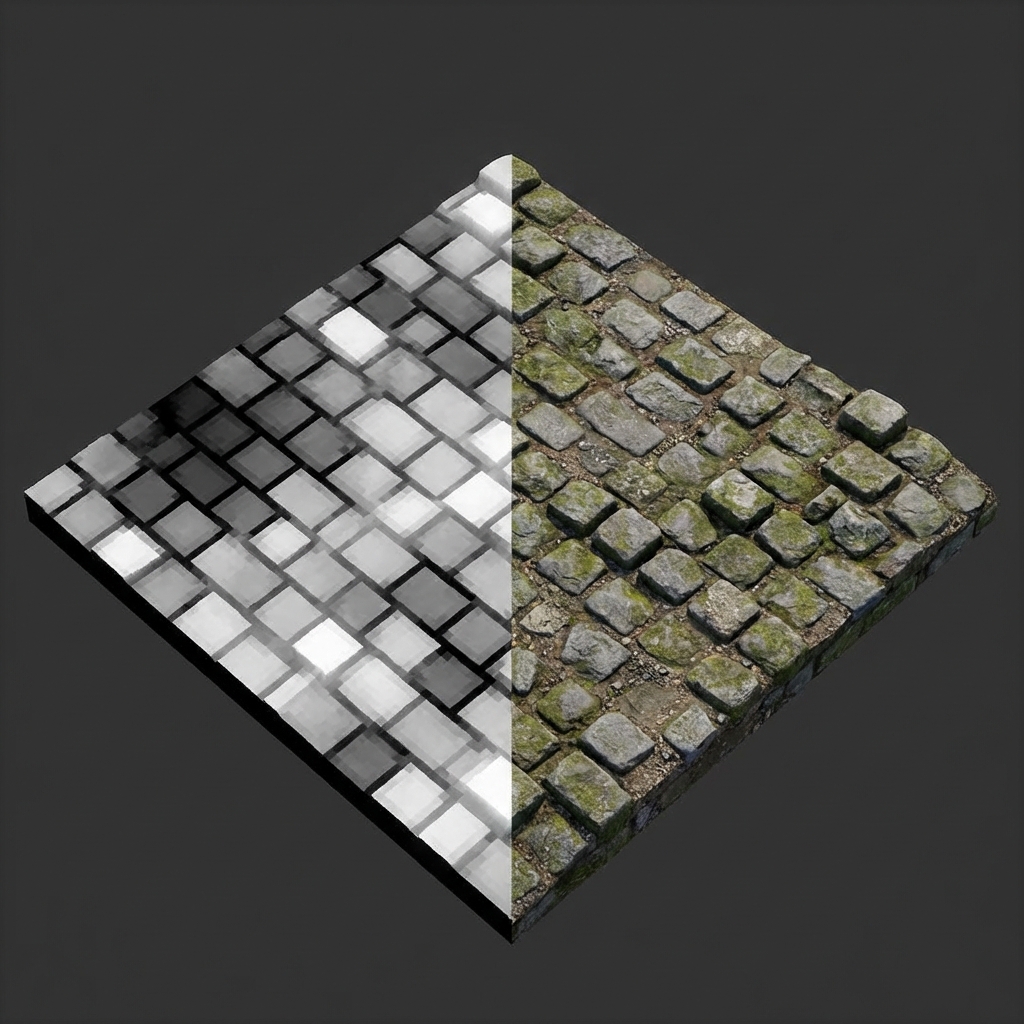
Data vs. Reality: Left side shows the Height Map (white = high), Right side shows the actual Displaced Geometry.
Normal Maps fake lighting detail, but the silhouette stays flat. Need a brick wall with real bumps on the edge? Need terrain that sticks up? That's where Height Maps and Displacement come in.
What is a Height Map?
A Height Map is a grayscale image used to store elevation data.
- White: High elevation (Peaks).
- Black: Low elevation (Valleys).
- Gray: Slopes / Mid-points.
The "Height Map" is just the data image. How you use it in 3D software determines whether it becomes a Bump Map or a Displacement Map.
Displacement Map: The Heavy Lifter
Displacement Mapping takes the data from a Height Map and physically pushes the vertices of your 3D mesh up or down. Unlike Normal Maps, this is not an illusion.
The Cost of Displacement
Displacement moves vertices, so you need vertices to move. Apply it to a basic 6-face cube and nothing happens. You need Tessellation or Subdivision to add density — which costs render time.
Comparison Table
| Feature | Normal Map | Displacement Map |
|---|---|---|
| Visual Efffect | Illusion of lighting/depth | True geometric depth |
| Silhouette | Flat / Unchanged | Changed / Jagged (Real 3D) |
| Performance | Very Cheap (Fast) | Expensive (Slow) |
| Best Use | Fine texturing (skin pores, fabric) | Large forms (mountains, brick walls) |
Generate Height Maps Instantly
Our tool automatically calculates height data from photos to create ready-to-use Displacement maps.
Start Generator